
As 1st September 2026 approaches, you must send your electronic invoicing address to your suppliers. This address is registered in the e-invoicing directory and ensures each invoice automatically makes its way to the correct destination: your company, a secondary establishment or even a specific department.
But how is this electronic invoicing address defined?
In practice, several concepts coexist: SIREN, SIRET, routing code, and more. It can be difficult to wrap your mind around it all.
In this guide, we’ll explain how an electronic invoicing address is defined, what information to send to your suppliers depending on how your company is organised and the role of the main addressing concepts. Then, we’ll give you a detailed description of how the electronic invoicing directory works.
What you need to know
- The electronic invoicing directory is a national repository that lists the electronic invoicing addresses of the companies subject to the reform.
- The directory enables automatic routing of electronic invoices between suppliers and clients.
- Your default e-invoicing address in the directory is your SIREN. Based on your organisational model, your accountant can help you to refine the addressing.
- As of now, approved platforms (plateformes agréées, PAs) are still in pilot phase, so you can’t set up your invoicing address yet.
- You can choose to receive invoices:
- at company level (SIREN);
- at an establishment (SIRET);
- or at a specific department using a routing code.
What is an electronic invoicing address?
An electronic invoicing address is a unique identifier for your company that allows your suppliers to send your invoices to the right place. This address is registered in the electronic invoicing directory.
This address is registered in the national directory and by default uses your SIREN or SIRET number (depending on whether you want to receive invoices at overall company level or at specific establishments).
Depending on the organisational model the recipient has chosen, other components can be added to this address (such as a suffix or routing code) to direct the invoice to a specific department.
Which electronic invoicing address should you send to your suppliers?
| I want to receive invoices for...r… | Electronic invoicing address to send |
|---|---|
| My company’s head office | SIREN123 456 789 (9-digit code) |
| One of my establishments (secondary establishment) | SIRET 123 456 789 00012 (14-digit code) |
| A department at the head office | SIREN + suffix 123 456 789 - ACCTG (9-digit code + routing code) |
| A department at one of my establishments | SIRET + routing code 123 456 789 00012 – PROC |
✅ Our advice: In 80–90% of cases, a SIREN-based electronic invoicing address suffices. Keep it simple at first. Think of your SIREN as your main inbox, then organise your invoicing flow internally, like you do already, amongst your different departments or establishments. If your needs change, you can later add more e-invoicing addresses.
⚠️ Special cases:
Depending on your company organisation, you may need to set things up in a specific manner, especially if you:
- perform different business activities with the same SIREN (BIC, BNC, LMNP, etc);
- have a complex internal organisation (several departments, cost centres, regional management, etc.);
These situations may warrant the use of an electronic invoicing address with a suffix or routing code.
Now you know which address to send to your suppliers. To take it a step further, let’s go over the main concepts that will help you to understand the various addressing levels.
What is an addressing level?
An addressing level is the level of precision the central directory uses to route an invoice. It is crucial for proper routing, especially if your company has several sites.
Addressing can be done at two levels:
- SIREN level (company level): all invoices are sent to the same Approved Platform (PA) and to the company’s unique e-invoicing address.
- SIRET level (establishment level): the directory registers a specific invoicing address (and potentially a PA) for each of your establishments (sites, branches).
This level must be selected when registering via your PA. The SIREN level is the simplest for VSEs/SMEs with a single establishment. For multi-site organisations, the SIRET level guarantees direct routing to the correct department. Incorrect settings can block invoicing flows.
– Suffix, routing code… what do these terms mean?
You may come across terms such as suffix or routing code when you create or check your electronic invoicing address. Both are used to refine invoice addressing, but are not used at the same level.
- A suffix supplements a SIREN (company level).
- A routing code supplements a SIRET (establishment level).
You should know that suffixes and routing codes are optional. They’re only useful if your company wants to distinguish several circuits for receiving electronic invoices. In most cases, a SIREN-based electronic invoicing address suffices.
To ensure platforms process invoices properly, these identifiers must use a specific format: they cannot include any spaces or accented characters. The only special characters allowed are full stops (.) and hyphens (-).
An example of how your suppliers will see your electronic invoicing address
Your address will be registered in the national directory immediately after it is configured in your PA. When a supplier enters your name, their software will automatically suggest your various reception points.
An example of reception points suggested to a supplier when sending an electronic invoice on the Pennylane PA.
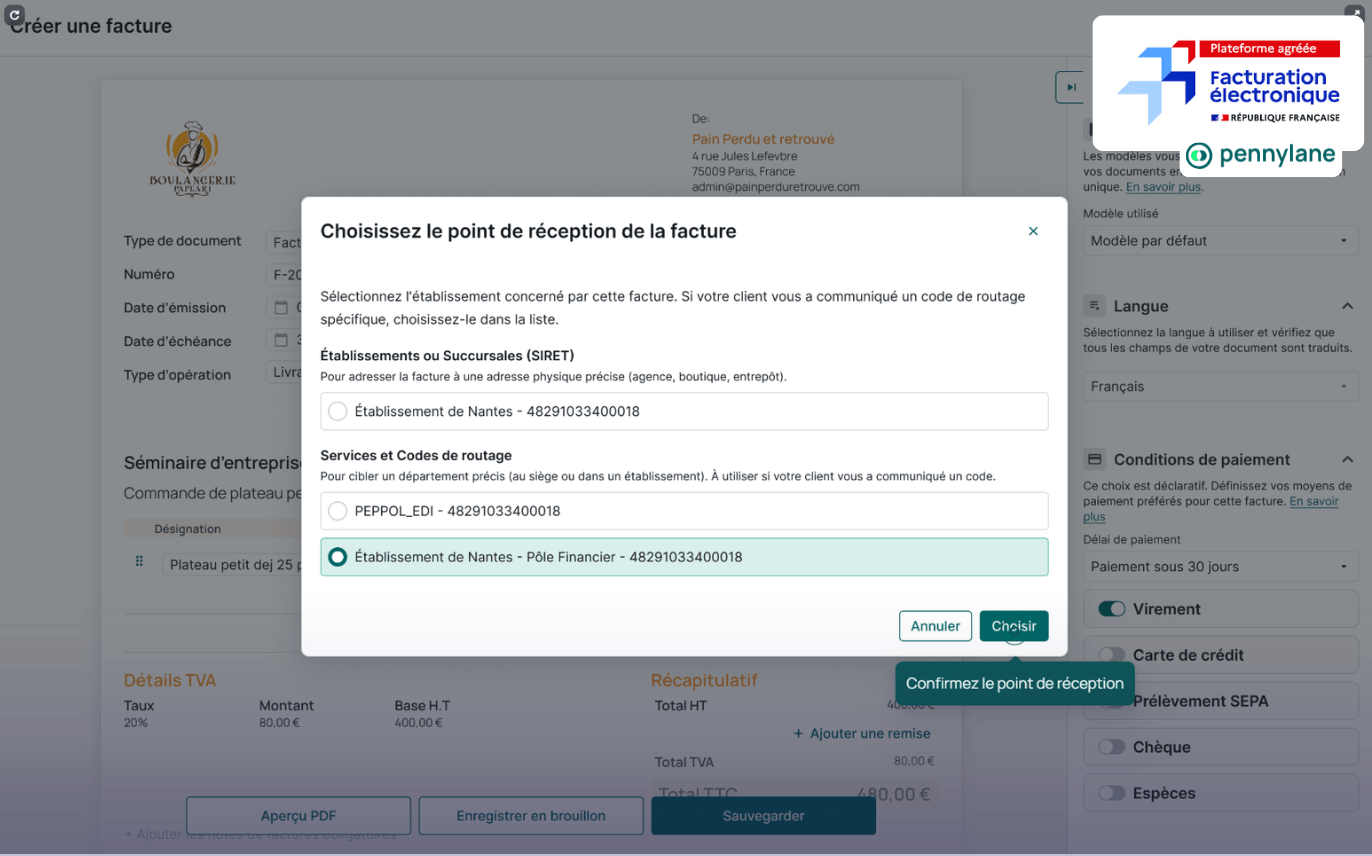
Based on your setup, they can choose from:
- your establishment (SIRET);
- a department using a routing code;
- or, if you set any up, another reception point.
Keep in mind: setting up your electronic invoicing address properly will ensure your suppliers can select the correct reception point when they are sending invoices.
Where do you define your electronic invoicing address?
You can define your various electronic invoicing addresses directly in your approved platform (e.g., Pennylane). Your PA will then transfer that information to the directory.
Keep in mind: As of now, approved platforms are still in pilot phase. The option to set up electronic invoicing addresses isn’t accessible yet.
Electronic invoicing directory: its role and how it works
What is the electronic invoicing directory?
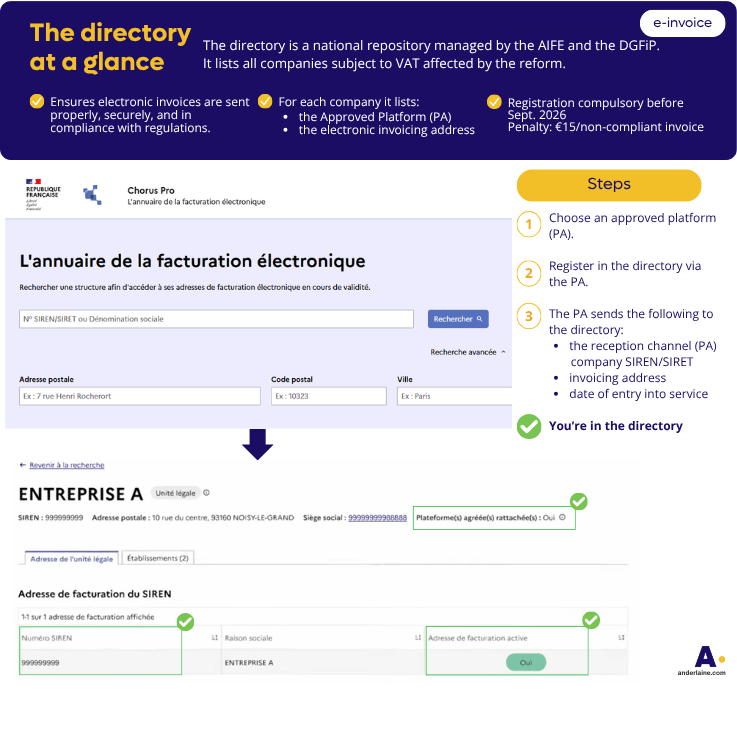
The electronic invoicing directory is a national repository managed by:
- The Agency for State Financial Information Technology (Agence pour l’Informatique Financière de l’État, AIFE),
- The Public Finances Directorate General (Direction Générale des Finances Publiques, DGFiP).
It’s a centralised national database that lists all businesses subject to VAT, leveraging the experience of the government’s public procurement platform, Chorus Pro.
It mainly relies on company SIREN numbers, which you enter to access the directory and ensure that your company is uniquely identified.
Below is an infographic pointing out the key aspects of the Chorus central electronic invoicing directory, including its role and the steps for registering. We’ll go over these points in more detail later.
What is the directory’s role?
The directory has three essential purposes:
- Identifying the Approved Platform (PA): it indicates the platform each company has chosen for receiving and sending invoices.
- Centralising electronic invoicing addresses: the addresses platforms use to send documents.
- Routing electronic invoices: using the PA entered in the directory enables invoices to be routed automatically from the supplier to the client.
Documents cannot be properly routed if a company is not registered in this directory.
From September, companies must ensure that their information is kept up to date in the directory (changes in PAs, invoicing addresses or business forms, if they move, etc.). Incorrect data can block all invoices from being routed.
Why is registering in the directory compulsory?
Registration is essential and, above all, compulsory before September 2026.
Because your invoices won’t circulate if you don’t register.
In practical terms, being registered in the directory ensures that:
- your company can properly receive invoices from suppliers;
- the authorities can recognise your business in their system;
- you meet legal B2B/B2C transmission obligations.
❗Failure to register may result in late payments, supplier disputes and administrative penalties.
❗The penalty can be as high as €15 per non-compliant invoice, which can represent a significant cost for companies with high business volumes.
How to register in the electronic invoicing directory
The steps for registering in the electronic invoicing directory are as follows:
- Choose a PA and register: you will need to prove that you are the company’s legal representative (Kbis), have a valid ID and meet the security requirements (usually two-factor authentication) required by the platform.
- Submit your directory registration request via your PA.
- Validate your request by rereading and confirming all the corporate information: Company SIREN/SIRET, reception channel (PA), e-invoicing address and date of entry into service.
- The PA then automatically sends the information to the AIFE and the DGFiP.
- The directory uses this information to route your electronic invoices.
Looking to delegate the whole process? You can entrust this task to your chartered accountant with an opt-in mandate.
Opt-in mandate: delegate your registration in the directory and ensure you choose the right PA
What is it?
The opt-in mandate is an electronic document that you sign electronically.
It officially empowers your chartered accountant to act on your behalf to ensure compliance with the e-invoicing reform.
What is it used for?
It allows you to legally delegate the two steps you must take to comply with electronic invoicing as a company subject to VAT:
- Choosing your PA and informing the authorities.
- Listing your company in the national directory.
Good news: the opt-in mandate is free.
Why work with a chartered accountant?
Your chartered accountant is a strategic partner that will support you in transitioning to paperless invoicing and ensuring compliance with the e-invoicing reform.
Your chartered accountant has already tested various solutions and selected one or more reliable PAs that work with your business. They are familiar with your sector-specific features (building and public works, hospitality, private practice, etc.) and can guide you towards the most appropriate solution.
You can delegate the obligatory steps by simply signing the opt-in mandate, in particular checking that you are the legal representative of your company or providing proof of identity. This helps you avoid errors and guarantees compliance.
What registration steps will be delegated to your chartered accountant?
When you sign the opt-in mandate, you delegate the entire directory registration process to your accountant. The process remains the same as if you were doing it yourself, but your accountant will take care of all the technical and administrative steps:
- Choosing or confirming the Approved Platform (PA) best suited to your business and how it operates.
- Completing the PA registration process: checking the corporate details of your company and/or your various establishments (SIREN/SIRET, contact details, VAT status, legal representative).
- Registering in the directory directly via the PA (e.g., Pennylane).
It will retrieve the corporate information and send it automatically. - Checking the compliance of data sent to the AIFE and the DGFiP.
Once the registration has been confirmed, the information is automatically updated in the directory and your invoices can be properly routed.
The advantage: you avoid mistakes, save time and ensure you are compliant before the 2026 deadline.
Don’t make these mistakes
- Not choosing a PA → you won’t be able to receive invoices.
- Choosing a PA that is not suited to your business.
- Not updating the directory in the event of a change (address, PA, legal restructuring).
Do you need help with getting your company ready for electronic invoicing?
FAQ
The reform affects all businesses subject to VAT, whether they are liable for VAT or exempt. They must have a PA.
- Businesses subject to VAT and liable for it:
- 1/9/2026: PA for receiving invoices
- 1/9/2027: then for issuing (e-invoicing or e-reporting)
- Retail and wholesale: PA for receiving invoices, then B2C e-reporting or B2B issuing (e-invoicing)
- Hospitality: PA for receiving invoices, then e-reporting
- Building and public works: certain accounting aspects (holdbacks, ongoing works) must be taken into account when choosing a PA
- Non-commercial profits (bénéfices non commerciaux, BNC): PA for receiving then e-invoicing or e-reporting
- Private-practice professions (professions libérales): PA for receiving then e-invoicing or e-reporting
- Healthcare professionals: PA for receiving invoices, not for issuing
- Micro-enterprises: PA for receiving current invoices
- Property investment companies (société civile immobilière, SCI): PA if subject to VAT
- Non-professional landlords of furnished accommodations (loueur en meublé non professionnel, LMNP): PA if subject to VAT
- Holding company: PA if subject to VAT
- Please note: this includes medical professions (doctors, nurses, physiotherapists, etc.), ski instructors, mountain guides, etc. These professions are subject to VAT in the legal sense (they engage in economic activity), but their operations are exempt under Articles 261 et seq. of the French General Tax Code. They are therefore concerned and must comply with the reform: they will need a PA to receive their invoices but will not be obliged to send them (except in special cases subject to VAT).
Yes. What you may have to pay: support to help ensure compliance.
Yes. You will then need to update the directory.
“Failure by a taxable person to comply with the obligation to issue an invoice in electronic form under the conditions set out in Article 289 bis gives rise to a fine of €15 per invoice.” Article 1737, II of the French General Tax Code (Code Général des Impôts, CGI).
Sources :
- French Ministry of Economy — DGFiP, Facturation électronique, 2024 — https://www.economie.gouv.fr/facturation-electronique
- AIFE — Chorus Pro / Documentation officielle, 2024 — https://chorus-pro.gouv.fr
- AIFE – Chorus Pro https://portail.chorus-pro.gouv.fr/aife_documentation

